


MD242 Hybrid watch face
4.5354.00 Reviews
App Specs
- Version
- Varies with Device
- Updated On
- License
- $2.29
- Downloads
- 100,000+
- Developer
- Matteo Dini MD ® Watch Faces
- Categories
- Personalization
- Platform
- Android
Screenshots
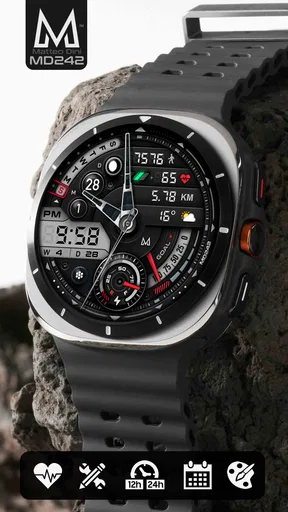
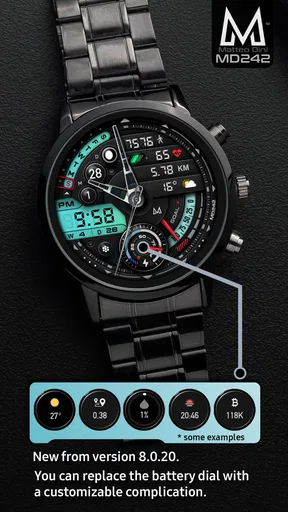
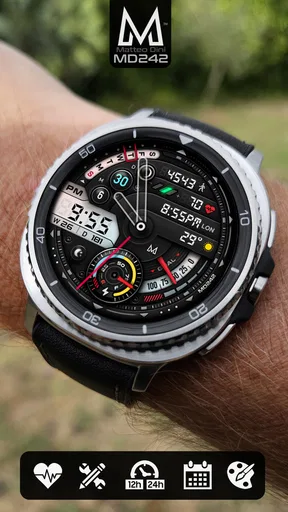
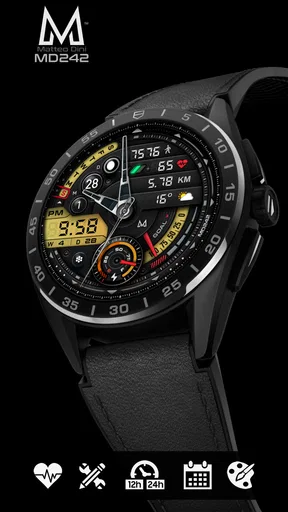
 Analysis by AppCompare
I approach a new watch face with one practical question: can I read what I need quickly, without turning my wrist into a cluttered display? MD242 Hybrid is a personalization app by Matteo Dini MD ® Watch Faces, designed for Wear OS. Its appeal is the mix of an analog-style clock and digital information, with customizable complications to make the layout more useful to the person wearing it. That makes it worth considering if you want more than a plain clock, but still care about how your watch looks.
Start with the information you actually use
Before changing anything, I’d think about what I reach for most during an ordinary day. If I mainly check the time and date, filling every available area with extra details would work against the point of a glanceable watch face. If I’m tracking activity or checking conditions before heading out, putting those details where I can see them could make the face more useful. The key is to treat customization as a choice about priorities, not a contest to display as much as possible.
That distinction helps explain who may enjoy this design. Someone who likes a traditional clock but wants digital details close by has a clear reason to try it. Someone who wants a completely bare dial, or prefers every piece of information to be hidden until tapped, may be happier with a simpler option. Hybrid styling has a particular visual character; it won’t suit every watch or every taste.
Set it up around a real routine
I’d begin with the time and the complication I’m most likely to check away from my phone. Then I’d wear the face through a normal day before making more changes. A commute, a walk, or a busy stretch of errands quickly reveals whether the layout is readable in motion and whether the information I chose is genuinely useful. That small test is more reliable than building an elaborate arrangement while looking at the settings screen.
For example, imagine leaving home in the morning, checking the time while walking to transit, and later glancing at activity progress during a break. A sensible configuration can keep those checks on the wrist instead of prompting a phone unlock. The benefit is not that the face replaces a phone or a dedicated activity app; it is that a few frequently used details are easier to consult at the right moment.
There is also a useful trade-off in deciding what to leave out. Every complication has a visual cost, even when the information itself is valuable. I’d avoid selecting items simply because they are available, and instead reserve space for details I act on. If a reading rarely changes what I do, it may be better left off the main face and checked elsewhere when needed.
Where the phone and watch hand off
Installing and configuring a Wear OS face involves both the watch and its companion phone environment, so a smooth result depends on the handoff between them. The watch is where the finished design needs to be comfortable and legible; the phone is where managing a purchase or changing options may be more convenient. If an adjustment does not appear straight away, I’d check that the watch has settled on the selected face and allow the devices a moment to sync before repeating the same change.
Worth Reading Before You Choose

EA SPORTS FC Mobile 26 Is a Bigger Football Game, but It Takes Time

Flipboard Shows What News Apps Must Do Beyond the Feed

Switching to Android Auto Means Rethinking Your Driving Routine

Google Calendar Makes a Crowded Week Easier to Manage

Ludo King Makes the Most of the Minutes Between Plans

Baby Panda World Brings Quick Play to Modern Phones, but Its Game Library Feels Busy
This is a practical point for first-time buyers: MD242 Hybrid is a Wear OS watch face, not a general phone personalization theme. The phone is part of the setup path, but the intended result is on a compatible Wear OS watch. I would check that the watch platform matches before paying, rather than assuming that any Android or iOS phone can use the face on its own.
How it compares with simpler faces
Compared with a basic digital face, a hybrid layout offers a more conventional clock appearance while keeping digital information nearby. Compared with a sparse analog face, it can make room for practical complications without asking the wearer to open another screen for every quick check. That middle ground is the main reason to choose it; it is not automatically better than either alternative.
If my priority were the cleanest possible dial, I’d choose a minimalist face and accept that I would need extra taps for details. If I wanted a dense instrument panel above all else, I’d compare other information-heavy designs and decide which arrangement I can read most comfortably. MD242 Hybrid makes most sense for someone who wants both clock styles represented and is willing to spend a little time deciding what belongs on the display.
What to expect before buying
The app costs $1.99 and is rated for Everyone. It was released on June 30, 2022, and has passed 100K installs. Its average rating is 4.5 from around 4.3K ratings, with 346 written reviews. Those figures suggest that it has found an audience, but they cannot tell me whether its look will suit your watch or whether your preferred complication arrangement will feel right; those are personal decisions best tested on your own wrist.
One question worth settling before purchase is whether the face works with your particular Wear OS watch and the information sources you expect to use. Complications can depend on what the watch and its setup make available, so I would not buy on the assumption that every possible data item will appear in every configuration. Another is whether you enjoy tuning a layout: if you want a fixed design with no decisions, the flexibility may feel like extra work rather than a benefit.
For a useful first pass, I’d configure only a few details, wear the face through a full routine, and note what I actually check. Then I’d adjust one thing at a time. This makes it easier to tell whether a change improved legibility or merely made the screen busier. It also avoids the common trap of judging a watch face only while the watch is sitting still on a table.
How it feels in everyday use
Have you ever found yourself endlessly scrolling through watch face options, only to feel like none of them quite match your style? Well, let me introduce you to the MD242 Hybrid watch face. I’ve been sporting this digital gem on my wrist for a week now, and it's fair to say I’ve found my new favorite.
First Impressions Matter
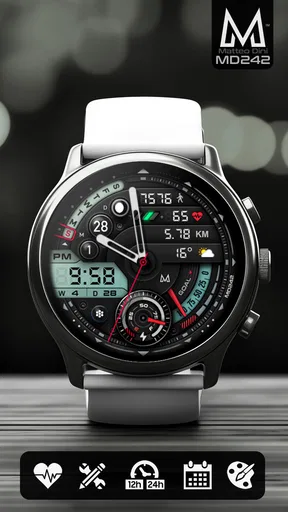
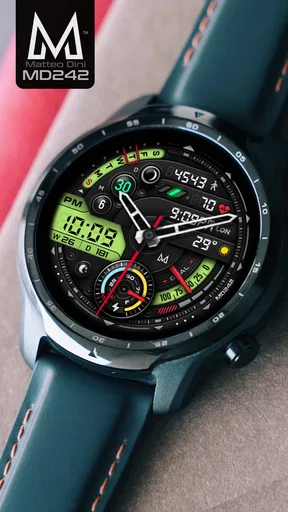
Right off the bat, what struck me about the MD242 Hybrid watch face was its sleek, modern design. It’s like having a mini digital dashboard right on your wrist. The blend of analog and digital elements offers a unique look that perfectly balances functionality and style. If you’re someone who loves a bit of tech flair with a touch of class, this watch face will speak to you.
Design and Customization
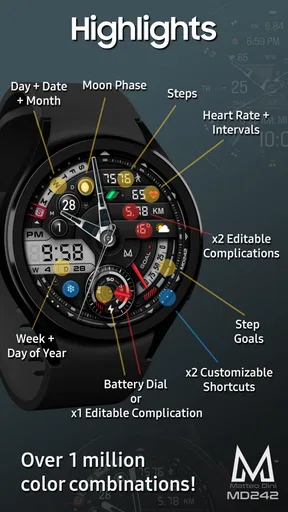
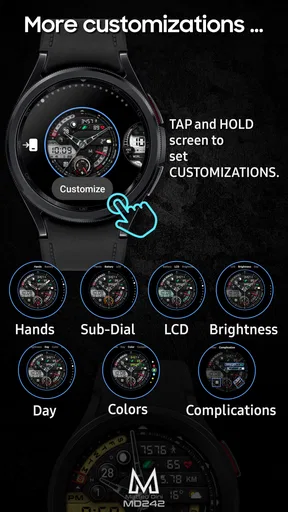
The customization options are where the MD242 Hybrid really shines. You can tweak everything from the color accents to the type of information displayed. Want your step count front and center? No problem. Prefer a minimalist look with just the time and date? You got it. This flexibility makes it feel like the watch face was designed just for you. The interface is intuitive, making customization a breeze—even if you’re not a tech wizard.
Functionality That Impresses
Now, onto the functionality. The MD242 Hybrid doesn’t just look good; it performs. The hybrid design beautifully marries an analog clock with digital data displays. I found the information layout to be incredibly efficient. At a glance, I could see my battery percentage, step count, and even the weather forecast. It’s like having a personal assistant on your wrist.
Especially noteworthy is the battery efficiency. I was concerned that such a feature-rich watch face might drain my battery faster than a kid in a candy store, but surprisingly, it’s quite the opposite. The MD242 Hybrid is optimized to ensure you’re not left with a dead watch halfway through your day.
Ease of Use
Installing and setting up the MD242 Hybrid was a straightforward process. Even if you’re new to customizing watch faces, the step-by-step guide provided makes it easy. The app also integrates seamlessly with both Android and iOS devices, so no matter your phone allegiance, you’re covered.
One small hiccup I encountered was during the initial sync with my smartphone. It took a couple of tries to get everything working perfectly, but once I did, it was smooth sailing from there.
Why It’s Worth It
So, why should you consider the MD242 Hybrid? For starters, it’s one of the most versatile watch faces I’ve come across. Whether you’re heading to a business meeting or going for a jog, it adapts to your lifestyle. It’s not just a watch face; it’s a statement piece that reflects your personality and keeps you connected.
The blend of aesthetics and functionality is where this watch face excels. It caters to those who appreciate innovation and style, without sacrificing practicality. Plus, with regular updates, you can be sure that the MD242 Hybrid will stay fresh and relevant, constantly evolving with user feedback.
The Final Word
In conclusion, the MD242 Hybrid watch face is a remarkable blend of form and function. It’s a powerful yet stylish tool that enhances your smartwatch experience. If you’re in the market for a watch face that offers extensive customization, efficient functionality, and a dash of elegance, then look no further. This isn't just a watch face; it’s a companion that keeps you informed and in style.
So, go ahead and give the MD242 Hybrid a spin. Trust me, your wrist will thank you.
When I would choose something else
My enthusiasm has limits: a hybrid dial asks you to accept a busier visual style than a plain analog face. In a meeting, for instance, I might want the time to be the only thing that catches my eye; in that case, a pared-back face is a better fit. Likewise, if I rarely check steps, battery, or weather from my wrist, the extra data is decoration rather than a practical advantage. The strongest setup is not the one with the most information, but the one that stays readable and earns its space.
I’d also be careful about treating a watch face as a guaranteed battery upgrade. My experience was positive, but battery life depends on the watch and the way it is used, so I would judge it over ordinary days rather than assume the same result for every device. If battery endurance is the deciding factor, compare how your watch behaves with your current face before drawing a conclusion.
A more deliberate way to make it yours
Color and complication choices can be approached as a small workflow. First choose an accent that is easy to distinguish from the rest of the dial, then place the information you check most often, and finally remove anything that competes with the time. I find it helpful to make changes in daylight and again indoors: a layout that looks crisp in one setting may feel crowded or harder to scan in another. That is a simple check, but it can prevent settling on a configuration that only looks good in the customization view.
For activity, a step count is most useful when it helps answer a specific question, such as whether I have moved much during a desk-heavy day. Weather is more valuable before leaving home than while I am already indoors. Thinking about when I consult each item makes the layout feel intentional, and it helps avoid relying on a complication at a moment when checking the phone would be more appropriate.
Who gets the most from it
I’d recommend it most to Wear OS owners who enjoy watch-face customization and want an analog-inspired appearance with digital details close at hand. It is also a reasonable choice for someone who likes changing the look to suit work and leisure, provided the chosen arrangement remains easy to read. The ability to emphasize a useful detail, such as steps, gives the design a role beyond matching an outfit.
I would steer away from it if you want a phone-only personalization app, a completely minimal dial, or a face that requires no setup decisions. It is also not the right purchase if you cannot use a Wear OS watch. That distinction matters more than the phone brand: the watch is where the face lives, so compatibility there is the first thing to sort out.
My recommendation
MD242 Hybrid is a paid personalization app from Matteo Dini MD ® Watch Faces, and its $1.99 price makes most sense when you expect to use the customization rather than simply admire the preview. I like its balance of familiar clock styling and at-a-glance details, but I would not call it universally better than a standard analog or digital face. Its value rests on whether that middle ground matches the way you actually use your watch.
My practical recommendation is to start with a restrained arrangement, live with it through a normal day, and only add details that solve a real glance-and-go need. The app has an Everyone age rating, but the more important question is personal fit: whether its hybrid look feels clear on your wrist and whether the complications you want are available in your setup. If those conditions line up, it is an appealing way to make a Wear OS watch feel more tailored without losing the quick simplicity a watch face should provide.
Pros
- Sleek
- modern design enhances watch appearance.
- Highly customizable with various display options.
- Low battery consumption for prolonged use.
- Compatible with both Android and iOS devices.
- Easy to navigate interface for quick setup.
Cons
- Limited free features; most require purchase.
- Occasional sync issues with certain devices.
- Customizations can be complex for beginners.
- Requires constant updates for optimal performance.
- Some users report minor lag during transitions.
FAQs for MD242 Hybrid watch face
What features does the MD242 Hybrid watch face offer?
The MD242 Hybrid watch face combines both digital and analog elements for a stylish look. It includes customizable complications like step count, heart rate, battery level, and weather updates. Users can personalize the color scheme and layout for a tailored experience. It's designed to be both functional and visually appealing.
Is the MD242 Hybrid watch face compatible with all smartwatches?
The MD242 Hybrid watch face is compatible with most smartwatches running Wear OS. However, it's essential to check the specific requirements and compatibility notes on the app's download page to ensure it works seamlessly with your device. Some features may vary depending on the smartwatch model and OS version.
How does the battery usage of the MD242 Hybrid watch face compare to other watch faces?
The MD242 Hybrid watch face is optimized for minimal battery consumption by using efficient coding and design. While it offers multiple features, users report that it maintains a balance between functionality and battery life. However, as with any watch face, the usage of interactive features and frequent updates can impact battery performance.
Can I customize the MD242 Hybrid watch face to match my style?
Yes, the MD242 Hybrid watch face offers extensive customization options. Users can change the color scheme, choose different data displays, and adjust the layout to better suit their personal style. This flexibility allows you to create a unique look that complements your preferences and daily needs.
How frequently is the MD242 Hybrid watch face updated?
The developers of the MD242 Hybrid watch face regularly release updates to enhance performance, fix bugs, and introduce new features. It's recommended to enable automatic updates or check the app store periodically to ensure you have the latest version, providing the best possible user experience.


